
Getting Started#
Welcome to petitRADTRANS! This series of tutorials will outline the basic features of pRT, from how to generate emission and transmission spectra to running atmospheric retrievals. If you’d like to run the tutorial notebooks yourself, they’re available on gitlab.
Preparing a radiative transfer object#
After installation has finished, let’s try to calculate a first spectrum! First we load required external packages though. We’ll use the jax.numpy package instead of the standard numpy, just to familiarize ourselves with it, but it’s almost exactly the same. However, by default JAX uses 32-bit floats, so we’ll set it to 64-bit mode to ensure that we have full numerical precision. Transmission spectra and emission spectra without scattering can be calculated single precision, but
scattering in emission requires setting the double precision mode.
JAX floating point precision must be set before importing any petitRADTRANS modules!
[1]:
from jax import config
config.update("jax_enable_x64", True)
import jax.numpy as jnp
import matplotlib.pyplot as plt
Then we’ll load pRT by importing:
[2]:
import petitRADTRANS
from petitRADTRANS.radtrans import Radtrans
print(f"petitRADTRANS version: {petitRADTRANS.__version__}")
petitRADTRANS version: 4.0.0a42
We also need the physical constants module:
[3]:
from petitRADTRANS import physical_constants as cst
The Radtrans object#
Let’s start out by creating a radiative transfer object using the Radtrans object.
This will load the requested opacities and create an object ready to calculate spectra once the atmospheric parameters (temperature, abundances, mean molar mass etc.) are set. We will explain the meaning of the function’s inputs below.
[4]:
radtrans = Radtrans(
    pressures=jnp.logspace(-6, 2, 100),
    line_species=("H2O.R400", "CO-NatAbund.R400", "CH4__MM.R400", "CO2.R400", "Na__NewAllard.R400", "K__Allard.R400"),
    rayleigh_species=("H2", "He"),
    gas_continuum_contributors=("H2--H2", "H2--He"),
    wavelength_boundaries=(0.3, 15.0),
)
Loading Radtrans opacities...
 Loading line opacities of species 'H2O.R400' from file '/Users/nasedkin/python-packages/petitRADTRANS/input_data/opacities/lines/correlated_k/H2O/1H2-16O/1H2-16O__POKAZATEL.R400_0.3-50mu.ktable.petitRADTRANS.h5'... Done.
 Loading line opacities of species 'CO-NatAbund.R400' from file '/Users/nasedkin/python-packages/petitRADTRANS/input_data/opacities/lines/correlated_k/CO/C-O-NatAbund/C-O-NatAbund__HITEMP.R400_0.1-250mu.ktable.petitRADTRANS.h5'... Done.
 Loading line opacities of species 'CH4__MM.R400' from file '/Users/nasedkin/python-packages/petitRADTRANS/input_data/opacities/lines/correlated_k/CH4/12C-1H4/12C-1H4__MM.R400_0.3-50mu.ktable.petitRADTRANS.h5'... Done.
 Loading line opacities of species 'CO2.R400' from file '/Users/nasedkin/python-packages/petitRADTRANS/input_data/opacities/lines/correlated_k/CO2/12C-16O2/12C-16O2__UCL-4000.R400_0.3-50mu.ktable.petitRADTRANS.h5'... Done.
 Loading line opacities of species 'Na__NewAllard.R400' from file '/Users/nasedkin/python-packages/petitRADTRANS/input_data/opacities/lines/correlated_k/Na/23Na/23Na__NewAllard.R400_0.1-250mu.ktable.petitRADTRANS.h5'... Done.
 Loading line opacities of species 'K__Allard.R400' from file '/Users/nasedkin/python-packages/petitRADTRANS/input_data/opacities/lines/correlated_k/K/39K/39K__Allard.R400_0.1-250mu.ktable.petitRADTRANS.h5'... Done.
 Successfully loaded all line opacities
 Loading CIA opacities for H2--H2 from file '/Users/nasedkin/python-packages/petitRADTRANS/input_data/opacities/continuum/collision_induced_absorptions/H2--H2/H2--H2-NatAbund/H2--H2-NatAbund__BoRi.R831_0.6-250mu.ciatable.petitRADTRANS.h5'... Done.
 Loading CIA opacities for H2--He from file '/Users/nasedkin/python-packages/petitRADTRANS/input_data/opacities/continuum/collision_induced_absorptions/H2--He/H2--He-NatAbund/H2--He-NatAbund__BoRi.DeltaWavenumber2_0.5-500mu.ciatable.petitRADTRANS.h5'... Done.
 Successfully loaded all CIA opacities
Successfully loaded all opacities
The first time you request an opacity, you may be prompted with a message asking you to select an opacity file among a numbered list. In that case, type the integer corresponding to the file you want to download, then press “Enter”. More information about loading the opacities in the next section.
First we define the pressure array of the atmosphere. Note that the pressures must always be sorted in increasing order, and be equidistant in log-space. The pressure is given to pRT in units of bar, although the internal units in petitRADTRANS are in cgs. Typically we recommend using around 100 layers in your computations. However, be careful, internally pRT converts the pressure to cgs units!
Next we define the line absorbers to be used for the calculation (line_species = ...). If you have a fresh pRT installation, your opacity folder will be empty. pRT will automatically download the species which are missing. Here we asked for the following molecular or atomic line absorbers to be included: H2O, CO-NatAbund (all isotopologues at naturally occurring isotope abundances on Earth), CH4, CO2, Na, and K. More information on the data loading process in the
next section.
Additionally, the Rayleigh scattering cross-sections for H2 and He were loaded, as well as the collision induced absorption (CIA) cross-sections for the H2--H2 and H2--He pairs, called gas_continuum_contributors above.
The wavelength range that was loaded for the opacities here extends from 0.3 to 15 microns.
And we are done! This step only needs to be carried out once, after this we are free to play with this radiative transfer (Radtrans) object, for example change the temperature, abundances, etc. Only if additional opacity species need to be loaded is it necessary to create a new Radtrans instance.
Units in petitRADTRANS: all units inside petitRADTRANS are in cgs. However, when interfacing with the code, you are expected to provide pressures in bars (more intuitive). Pressures will be converted to cgs units within the code.
Loading opacities#
Opacities can have different sources. You can either select one of them by adding tags such as __HITEMP or __Allard to the absorber names (e.g., H2O__HITEMP or H2O__Exomol) or by just writing H2O and setting a default line list, that will be saved for future uses (see information in the next section for more details). pRT will do this by automatically asking you the first time you request a species (e.g., H2O) for which multiple options are available.
If you do not want to run at pRT’s standard resolution for correlated-k opacities (\(\lambda/\Delta\lambda = 1,000\)) you can request another spectral resolution with .R300, so H2O.R300, for example. This will bin down the opacities accordingly, and add them to the input data folder in this new resolution. This is described more in “Rebinning opacities”.
More information on the file naming convention and opacity request are available in the opacities section.
Configuring the input_data folder#
One of the most important things to setup pRT is to give the path to the input_data folder, where critical data such as opacities are stored.
This path is managed by the pRT config file. You may have seen that it has been automatically generated after importing a Radtrans object for the first time.
By default, the input_data folder is placed into your home directory, under <home>/petitRADTRANS/input_data. To set the input_data path manually, the simplest way is to execute the following, giving the path corresponding to your setup:
[5]:
from petitRADTRANS.config import petitradtrans_config_parser
# petitradtrans_config_parser.set_input_data_path(r'~/petitRADTRANS/input_data')  # replace this path with the actual path to your input_data directory  # noqa: E501
petitRADTRANS config file: petitradtrans_config_parser is an object derived from the ConfigParser Python standard object. It is a way to easily manage customizable software configuration. When instantiated for the first time, petitradtrans_config_parser will create a petitradtrans_config_file.ini file in a .petitradtrans directory in your home directory. You can access this file and modify it manually if you want to.
The default opacities to load (in case there are multiple options, e.g., H2O__HITEMP or H2O__Exomol for water), as well as the link to download opacities, are stored in this file too.
Locating the input_data folder#
The input_data folder can be located as follows:
[6]:
petitradtrans_config_parser.get_input_data_path()
[6]:
'/Users/nasedkin/python-packages/petitRADTRANS/input_data'
Calculating a transmission spectrum#
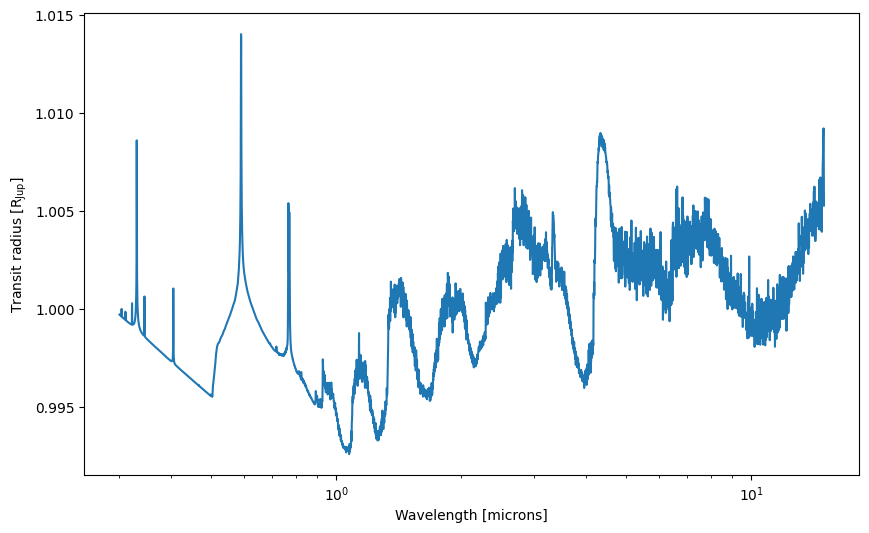
Let’s calculate a spectrum for a hot Jupiter, first in transmission. Let’s assume an isothermal temperature profile, for now. We start by specifying the temperature array, and abundance dictionary, containing the mass fractions of the atmospheric material, at every layer, and the mean molar masses, at every layer, in units of g:
[7]:
# note that radtrans.pressures is in cgs units now, multiply by 1e-6 to get bars
temperatures = 1200 * jnp.ones_like(radtrans.pressures)

mass_fractions = {
    "H2": 0.74 * jnp.ones(temperatures.size),
    "He": 0.24 * jnp.ones(temperatures.size),
    "H2O": 1e-3 * jnp.ones(temperatures.size),
    "CO-NatAbund": 1e-2 * jnp.ones(temperatures.size),
    "CO2": 1e-4 * jnp.ones(temperatures.size),
    "CH4__MM": 1e-5 * jnp.ones(temperatures.size), # Mass fraction keys must match opacity names
    "Na__NewAllard": 1e-4 * jnp.ones(temperatures.size),
    "K__Allard": 1e-6 * jnp.ones(temperatures.size),
}

#  2.33 is a typical value for H2-He dominated atmospheres
mean_molar_masses = 2.33 * jnp.ones(temperatures.size)
Note the P-T profile of a real planet will likely be different (e.g., not isothermal). Also the abundances are made up for this simple example here (see “Interpolating chemical equilibrium abundances” for how to improve this.)
Abundances in petitRADTRANS: abundances in pRT are in units of mass fractions, not number fractions (aka volume mixing ratio, VMR). One can convert between mass fractions and VMRs by using \begin{equation}
X_i = \frac{\mu_i}{\mu}n_i,
\end{equation} where \(X_i\) is the mass fraction of species \(i\), \(\mu_i\) the molar mass of a molecule/atom/ion/… of species \(i\), \(\mu\) is the atmospheric mean molar mass, and \(n_i\) is the VMR of species \(i\). This is implemented in petitRADTRANS.chemistry.utils.mass_fractions2volume_mixing_ratios() and petitRADTRANS.chemistry.utils.volume_mixing_ratios2mass_fractions().
Next, let’s assume a planetary radius and gravity at a given reference pressure (in bar!) in the atmosphere, and we are all set!
[8]:
planet_radius = 1.0 * cst.r_jup_mean
reference_gravity = 10**3.5
reference_pressure = 0.01
Now we simply generate a transmission spectrum. The calculate_transit_radii function returns wavelengths in cm and transit radius in cm, as well as a dictionary of additional optional outputs, which is empty in our example, since we did not request anything in addition.
[9]:
wavelengths, transit_radii, _ = radtrans.calculate_transit_radii(
    temperatures=temperatures,
    mass_fractions=mass_fractions,
    mean_molar_masses=mean_molar_masses,
    reference_gravity=reference_gravity,
    planet_radius=planet_radius,
    reference_pressure=reference_pressure,
)
Let’s plot the transit radius!
[10]:
fig, ax = plt.subplots(figsize=(10, 6))

ax.plot(wavelengths * 1e4, transit_radii / cst.r_jup_mean)
ax.set_xscale("log")
ax.set_xlabel("Wavelength [microns]")
ax.set_ylabel(r"Transit radius [$\rm R_{Jup}$]")
[10]:
Text(0, 0.5, 'Transit radius [$\\rm R_{Jup}$]')
Let’s take a look at how some of these parameters affect the spectrum! Note that the interactive plotting is only for display - we’re interpolating the spectrim between a few points to give an idea of how the spectrum changes when you change the parameters, but it is not quantitatively correct!
[22]:
from getting_started_transmission_explorer import display_getting_started_transmission_explorer
display_getting_started_transmission_explorer(height=760)
Calculating an emission spectrum#
Scattering and petitRADTRANS: scattering is included for emission spectra in petitRADTRANS only if requested specifically when generating the Radtrans object, as it increases the runtime (see “Scattering for Emission Spectra” for an example on how to do this). We neglect the scattering here.
Let’s calculate an emission spectrum. Using the isothermal temperature structure from above will simply result in a black body spectrum. pRT returns all spectra in cgs units at the planetary “surface” (i.e., the top of the atmosphere).
[12]:
wavelengths, flux, _ = radtrans.calculate_flux(
    temperatures=temperatures,
    mass_fractions=mass_fractions,
    mean_molar_masses=mean_molar_masses,
    reference_gravity=reference_gravity,
)

fig, ax = plt.subplots(figsize=(10, 6))

ax.plot(wavelengths * 1e4, flux)

plt.xscale("log")
ax.set_xscale("log")
ax.set_xlabel("Wavelength [microns]")
ax.set_ylabel(r"Planet flux, $F_{\lambda}$ [erg cm$^{-2}$ s$^{-1}$ cm$^{-1}$]")
[12]:
Text(0, 0.5, 'Planet flux, $F_{\\lambda}$ [erg cm$^{-2}$ s$^{-1}$ cm$^{-1}$]')
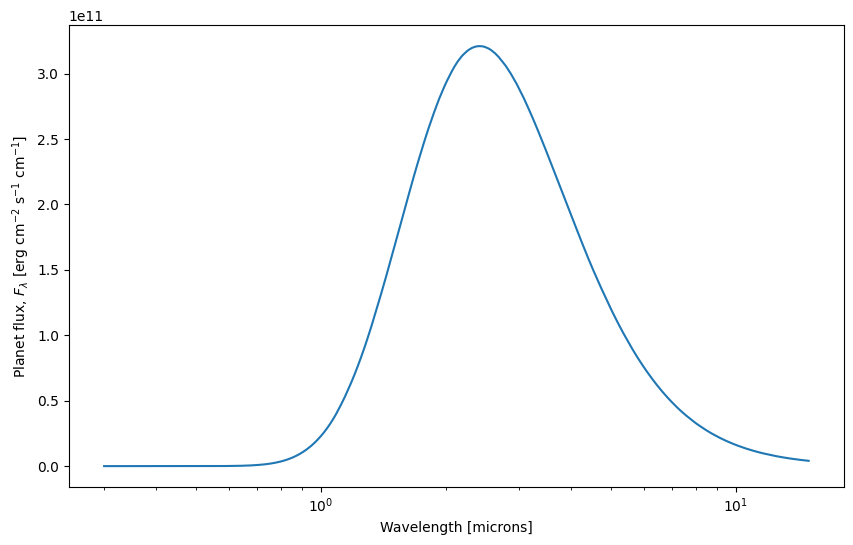
Standard flux units: before pRT3 flux was accessed as atmosphere.flux after running atmosphere.calc_flux(), which contained flux as \(F_\nu\), so in units of erg cm\(^{-2}\) s\(^{-1}\) Hz\(^{-1}\). pRT’s calculate_flux() method now returns wavelength and flux as \(F_\lambda\) in its standard setting, so flux in erg cm\(^{-2}\) s\(^{-1}\) cm\(^{-1}\). To return frequencies and \(F_\nu\), instead of wavelengths and \(F_\lambda\),
please set the keyword frequencies_to_wavelengths=False when calling calculate_flux().
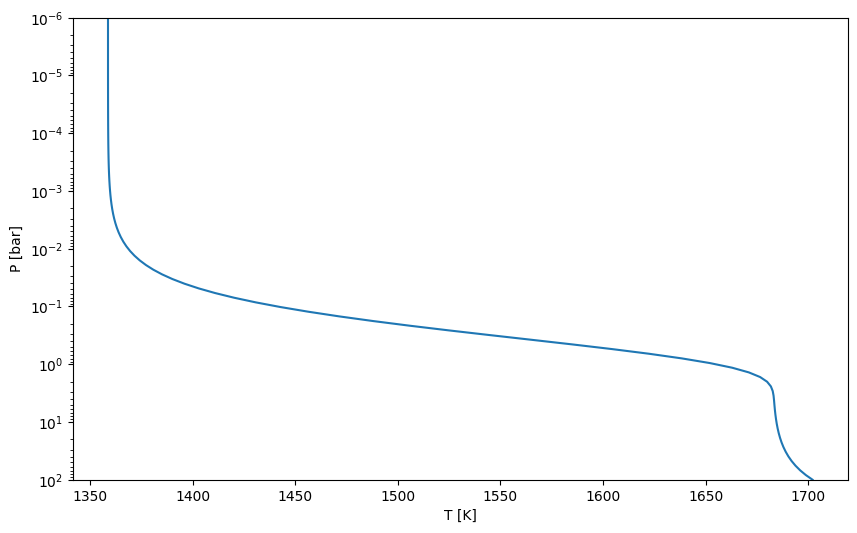
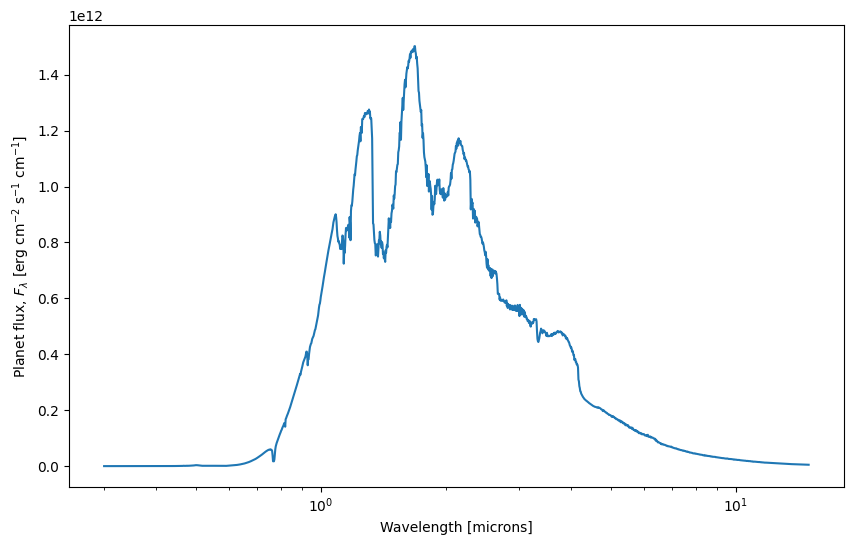
Let’s try a different temperature structure instead, namely the often-used analytical profile from Guillot (2010), his Equation 29:
\begin{equation} T^4 = \frac{3T_{\rm int}^4}{4}\left(\frac{2}{3}+\tau\right) + \frac{3T_{\rm equ}^4}{4}\left[\frac{2}{3}+\frac{1}{\gamma\sqrt{3}}+\left(\frac{\gamma}{\sqrt{3}}-\frac{1}{\gamma\sqrt{3}}\right)e^{-\gamma\tau\sqrt{3}}\right] \end{equation}
with \(\tau = P\kappa_{\rm IR}/g\). Here, \(\tau\) is the optical depth, \(P\) the pressure, \(\kappa_{\rm IR}\) is the atmospheric opacity in the IR wavelengths (i.e., the cross-section per unit mass), \(\gamma\) is the ratio between the optical and IR opacity, \(T_{\rm equ}\) the atmospheric equilibrium temperature, and \(T_{\rm int}\) is the planetary internal temperature.
[13]:
from petitRADTRANS.temperature_profiles import guillot_temperature_profile

pressures = jnp.asarray(radtrans.pressures) * 1e-6  # cgs to bar

infrared_mean_opacity = 0.01
gamma = 0.4
intrinsic_temperature = 200
equilibrium_temperature = 1500


temperatures = guillot_temperature_profile(
    pressures=pressures,
    infrared_mean_opacity=infrared_mean_opacity,
    gamma=gamma,
    gravities=reference_gravity,
    intrinsic_temperature=intrinsic_temperature,
    equilibrium_temperature=equilibrium_temperature,
    redistribution_coefficient=0.25, # global average
)
The history saving thread hit an unexpected error (OperationalError('unable to open database file')).History will not be written to the database.
Let’s plot the P-T profile:
[14]:
fig, ax = plt.subplots(figsize=(10, 6))

ax.plot(temperatures, pressures)
ax.set_yscale("log")
ax.set_ylim([1e2, 1e-6])
ax.set_xlabel("T [K]")
ax.set_ylabel("P [bar]")
[14]:
Text(0, 0.5, 'P [bar]')
And recalculate the spectrum:
[15]:
wavelengths, flux, _ = radtrans.calculate_flux(
    temperatures=temperatures,
    mass_fractions=mass_fractions,
    mean_molar_masses=mean_molar_masses,
    reference_gravity=reference_gravity,
)
fig, ax = plt.subplots(figsize=(10, 6))

ax.plot(wavelengths * 1e4, flux)

ax.set_xscale("log")
ax.set_xlabel("Wavelength [microns]")
ax.set_ylabel(r"Planet flux, $F_{\lambda}$ [erg cm$^{-2}$ s$^{-1}$ cm$^{-1}$]")
[15]:
Text(0, 0.5, 'Planet flux, $F_{\\lambda}$ [erg cm$^{-2}$ s$^{-1}$ cm$^{-1}$]')
[20]:
from getting_started_emission_explorer import display_getting_started_emission_explorer
display_getting_started_emission_explorer(height=760)
Often when comparing models to data, we want to know what the spectrum would be as observed from earth. If we know the distance to the planet and the planet radius, we can calculate this using the function petitRADTRANS.physics.flux2irradiance().
An alternative: the SpectralModel object#
The Radtrans object is pRT’s foundation. It gives a lot of control on the spectral parameterization, as shown in this notebook.
An alternative to Radtrans is the SpectralModel object, which uses Radtrans as a parent object, and automatise most of the steps required to obtain a spectrum. The SpectralModel object comes with default functions to automatically calculate the temperature, mass fractions, etc, and these functions can easily be customised. More information can be found in “SpectralModel”.